

You’ve probably said it before: “We should really document how we do this.” And then something else came up, and the documenting never happened, and six months later you’re re-explaining the same process to a new team member for the fourth time. You’re not alone. Most owners know they need standard operating procedure examples to work from, but the documenting keeps getting pushed aside.
This post gives you real, practical standard operating procedure examples for small businesses across several common functions, plus a simple template structure you can steal and adapt. No jargon, no binders required. Just clear, usable frameworks that help your business run more consistently whether you’re in the room or not.
Why SOPs Matter More Than Most Small Business Owners Realize
Standard operating procedures are step-by-step documents that explain exactly how to complete a specific task or process in your business. They exist so that the way things get done doesn’t live only in someone’s head — including yours.
That might sound like big-company stuff. It isn’t. In fact, the smaller your team, the more a single undocumented process can create chaos when something changes.
Businesses without standardized processes spend up to 30% more time on routine tasks than those with well-documented SOPs. For a five-person team, that’s the equivalent of losing half a full-time employee to inefficiency — every single week.
— World Business Outlook (December 2025)
The cost of undocumented processes isn’t just time. It’s also risk. And the data on that front is equally striking:
SowFlow’s 2026 small business operations guide cites research showing that 85% of business failures trace back to problems in systems and procedures — not employee performance. Your team isn’t the problem. The missing documentation is.
In other words: if things keep going wrong in your business, the answer usually isn’t working harder or hiring better people. It’s building better systems.
What a Good SOP Looks Like
Before we get into examples, here’s the anatomy of a well-built SOP. It doesn’t need to be complicated — in fact, the simpler the better. Most SOPs for small businesses can fit on one page.
Every SOP should include:
- Title — What process is this? (e.g., “Client Onboarding Checklist” or “Weekly Social Media Publishing Process”)
- Purpose — One or two sentences on why this process exists and what a successful outcome looks like
- Who it applies to — Which team members or roles use this SOP
- Tools needed — Any software, templates, or resources required
- Step-by-step instructions — Numbered, clear, specific. No assumed knowledge.
- What to do if something goes wrong — A brief escalation path or troubleshooting note
- Last reviewed date — SOPs should be living documents, reviewed every 3–6 months
Standard Operating Procedure Examples for Small Business
Here are real standard operating procedure examples across six common small business functions. Each one is structured so you can adapt it directly to your own business.
SOP Example 1: New Client Onboarding
Purpose: Ensure every new client receives a consistent, professional welcome and has everything they need to start working with us effectively.
Who uses it: Owner / VA / Account Manager
Tools: CRM, email template library, project management tool (Asana/ClickUp), contract platform
Steps:
- Send signed contract and invoice within 24 hours of verbal agreement
- Once contract is signed, add client to CRM and project management tool
- Send welcome email using the client welcome template (link to template)
- Schedule kickoff call within 5 business days
- Create client folder in Google Drive using the standard folder structure template
- Complete kickoff call and send follow-up summary within 24 hours
- Add client to monthly reporting schedule
SOP Example 2: Weekly Social Media Publishing
Purpose: Publish a consistent weekly social media presence without requiring the business owner to manage the process manually each week.
Who uses it: VA / Social Media Manager
Tools: Content calendar, Canva, Buffer or Hootsuite, brand guidelines document
Steps:
- By Monday at 9am: review the content calendar for the current week
- Draft all post captions for the week in the content planning document
- Create or source graphics for each post using approved Canva templates
- Submit draft posts for approval by Tuesday at noon (tag owner in project tool)
- Address any feedback and schedule all approved posts by Wednesday at 5pm
- Monitor comments and messages daily; flag anything requiring owner response
- Pull weekly engagement report every Friday and add to the monthly tracker
SOP Example 3: Monthly Bookkeeping Close
Purpose: Ensure books are reconciled, accurate, and ready for review by the 10th of each month.
Who uses it: QuickBooks ProAdvisor / Bookkeeper / VA
Tools: QuickBooks Online, bank portal, credit card portal, expense receipt folder
Steps:
- Download all bank and credit card statements for the prior month
- Reconcile all accounts in QuickBooks against downloaded statements
- Categorize any uncategorized transactions; flag unusual items for owner review
- Record any outstanding invoices or bills
- Run profit and loss report and balance sheet; save to client financial folder
- Send monthly financial summary email to owner by the 10th of the month
- Note any discrepancies or items requiring CPA input
SOP Example 4: Responding to a New Inquiry or Lead
Purpose: Ensure every potential client inquiry receives a timely, professional response that moves them toward a discovery call.
Who uses it: Owner / VA / Admin
Tools: CRM, email templates, scheduling tool (Calendly or Acuity)
Steps:
- Respond to all new inquiries within 1 business day (4 hours if possible)
- Use the inquiry response email template; personalize the opening line
- Add the lead to the CRM immediately, noting the source and inquiry type
- Include a link to the discovery call scheduler in the response
- If no response within 3 days, send a single follow-up using the follow-up template
- If no response after follow-up, move to inactive in CRM and add to the nurture email sequence
- Log all inquiry activity in the CRM notes field
SOP Example 5: Employee or Contractor Offboarding
Purpose: Ensure that when a team member departs, all access is removed, knowledge is captured, and the transition is handled without disruption.
Who uses it: Owner / Operations Manager / HR
Tools: Password manager, Google Workspace admin, project management tool, offboarding checklist template
Steps:
- Schedule a knowledge transfer session at least 1 week before the last day
- Document all ongoing projects, current status, and outstanding tasks
- Update all relevant SOPs with anything only this person knew how to do
- Remove access to all tools and platforms on the last day (use the platform access checklist)
- Transfer ownership of any files, folders, or accounts to the appropriate person
- Revoke password manager access and update any shared credentials
- Send a written summary of the transition to relevant stakeholders
SOP Example 6: Handling a Client Complaint
Purpose: Ensure all client complaints are handled consistently, professionally, and with a resolution mindset — regardless of who receives the complaint first.
Who uses it: All client-facing team members
Tools: CRM, escalation contact list, complaint log template
Steps:
- Acknowledge the complaint within 4 business hours — do not wait until you have a solution
- Listen fully before responding; do not become defensive
- Log the complaint in the CRM complaint log with date, client, and description
- If the issue can be resolved at your level, do so and confirm resolution in writing
- If escalation is needed, notify the owner within 2 hours with a written summary
- Follow up with the client within 48 hours of resolution to confirm satisfaction
- Review the complaint in the next team meeting to identify any process improvement needed
Free SOP Template You Can Use Right Now
Here’s a simple, copy-paste template for any SOP you need to create:
- SOP Title: [Name of the process]
- Purpose: [What this process accomplishes and why it matters]
- Applies to: [Who uses this SOP]
- Tools required: [Software, templates, or resources needed]
- Steps: [Numbered list of actions in order]
- If something goes wrong: [Who to contact or what to do]
- Last reviewed: [Date] | Next review due: [Date + 6 months]
That’s it. Start with one process that causes the most confusion or requires the most explaining — and document it this week. Even a rough first draft is infinitely better than nothing at all.
Where to Start If You Have No SOPs Yet
The most common reason small businesses don’t have SOPs isn’t laziness. It’s that nobody has made it their job to build them. When everyone is responsible for documentation, nobody does it.
Here’s a practical starting sequence if you’re beginning from scratch:
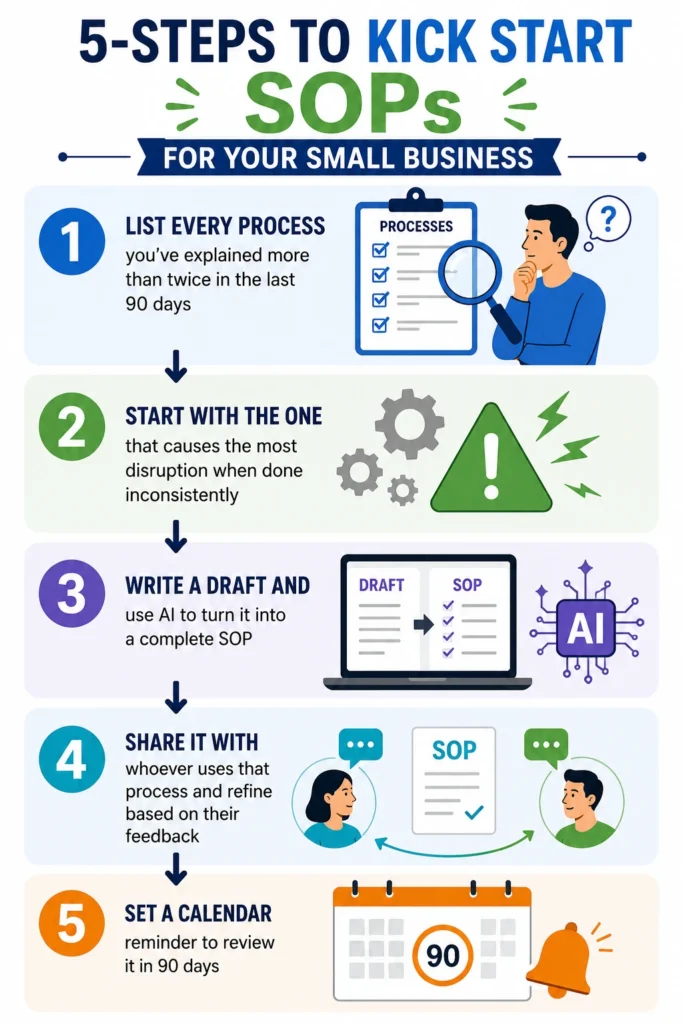
If the thought of building SOPs for your entire business feels overwhelming, that’s a signal you might benefit from bringing in operational support. Part of what I do as a PMP-certified virtual assistant is help small businesses and nonprofits build exactly this kind of infrastructure — documenting processes, creating SOP libraries, and setting up the systems that let you delegate confidently and scale without chaos.
Ready to Build Systems That Actually Work?
If your business is running on memory and repetition rather than documentation and process, we should talk. I help small businesses and nonprofits build the operational foundation they need to grow — and that always starts with getting the right things written down. Let’s chat!